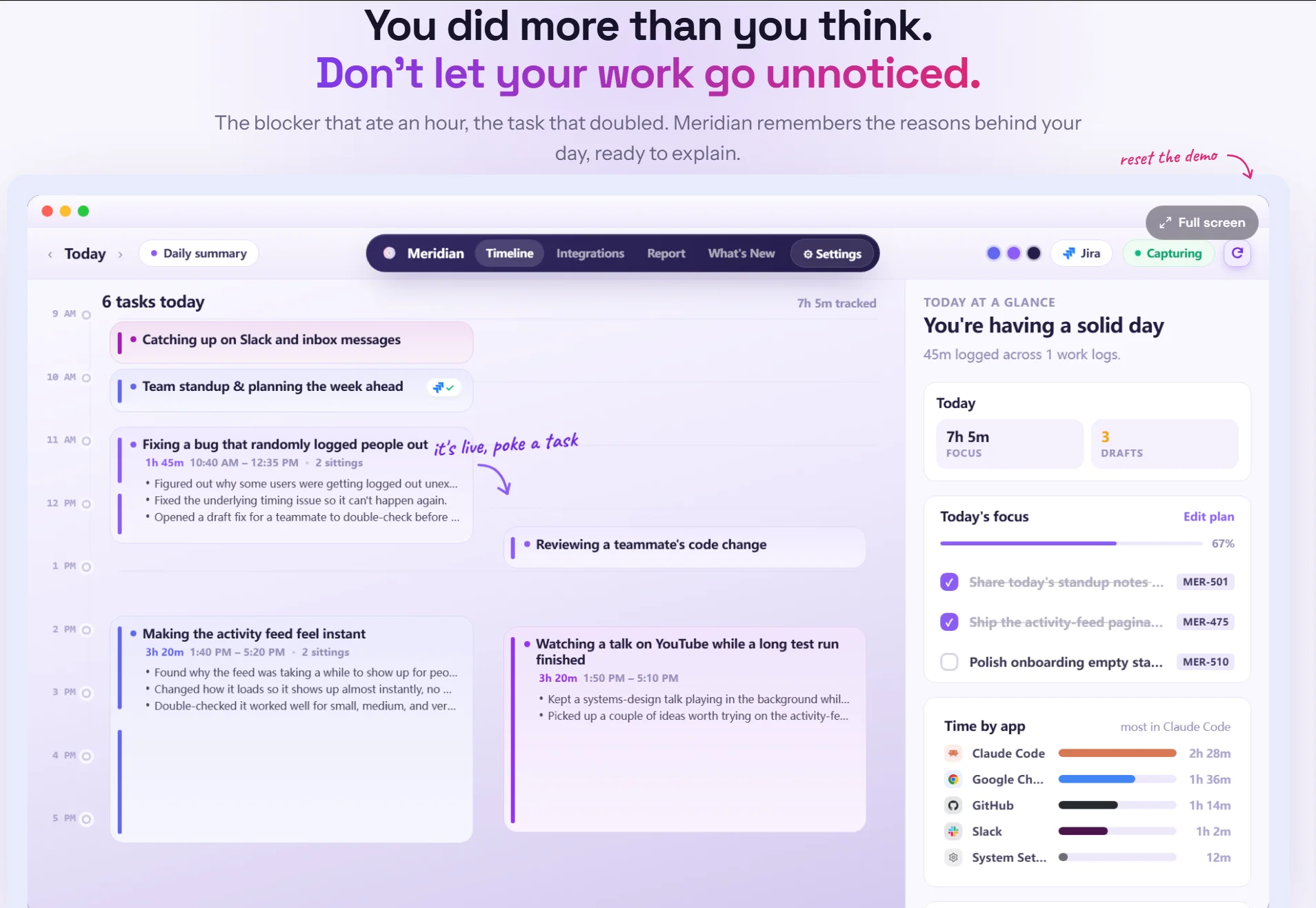
On Product Hunt, Meridian launched with a direct and resonant tagline: “Don’t let your work go unnoticed. Get promoted!” It earned strong early traction, including #1 Product of the Day recognition, and sits at a 4.7 rating. The official site frames the product more quietly and accurately: “the work journal that remembers your day.”
Meridian is an open-source (MIT-licensed), fully local AI work journal that runs on your Mac or Windows machine. It observes the apps and windows you actually use, reconstructs your day into meaningful work sessions, matches activity to tasks in tools like Jira or GitHub, and drafts plain-English summaries and status updates. Nothing is posted anywhere until you review and approve it. The core promise is simple: do the work; let the remembering take care of itself.
This review examines Meridian from every practical angle that matters to individual developers and engineering teams: the problem it solves, how the local capture and summarization work, privacy and open-source posture, integrations with project tools, the daily journal experience, strengths, limitations, and who should use it.
The Problem Meridian Addresses
Modern engineering work rarely matches the clean ticket-to-PR story that project management tools assume. A developer picks up a ticket, then spends significant time debugging an unexpected issue, reviewing a teammate’s PR, investigating a flaky test, answering questions, or handling an incident. All of that work is real and valuable. Much of it never appears in the original estimate or the end-of-day update.
When the sprint slips, the narrative often becomes “the estimate was wrong,” when in reality a large volume of unplanned but necessary work occurred. Standups and status updates become exercises in reconstruction and under-reporting. Over time, the gap between planned work and actual contribution hurts both individual recognition and organizational understanding of how work actually gets done.
Meridian was built to close that gap without turning into a surveillance tool. It captures the shape of the day automatically, keeps everything on-device, and only surfaces drafted updates for human approval.
How Meridian Works
Meridian runs quietly in the background on macOS (Apple Silicon, macOS 14+) or Windows (10/11 64-bit). It observes the applications and windows you work in, uses on-device analysis (including OCR where helpful), and reconstructs the day into coherent work sessions. It then attempts to associate those sessions with open tasks in connected project management tools.
By the end of the day you receive:
- A clear timeline of where time actually went (focused coding, debugging, review, meetings, etc.).
- A breakdown of tasks touched, completed, or deferred, with notes on why estimates held or slipped.
- Drafted status updates written in plain English, matched to the relevant tickets, ready for one-click approval and posting.
The product deliberately separates capture from publication. Connections to Jira, Linear, GitHub Projects, Azure DevOps, and Trello are read-only until you explicitly approve a log. Meridian never writes to your board on its own.
Even without any project management integration, Meridian functions as a private, searchable personal work journal. Every day is preserved with enough context that you can later answer “What was I actually working on three months ago?” or “Why did this ticket take longer than expected?”
Privacy and Open-Source Design
Privacy is a first-class design constraint rather than a marketing claim. Capture, analysis, and the journal database all run on your device. The database is encrypted at rest. The only data that ever leaves the machine is a worklog you have reviewed and approved, sent directly to the PM tool of your choice.
The entire codebase is MIT-licensed and auditable. There are no feature tiers, no trial walls, and no credit-card requirements for individual use. Users can exclude specific apps, pause capture from the menu bar at any time, and delete any portion of the journal.
This combination of local-first architecture and open source makes Meridian suitable for environments where cloud-based activity trackers or time-tracking tools would be unacceptable.
Integrations and Workflow Fit
Supported project tools at launch include Jira, Linear, GitHub Projects, Azure DevOps, and Trello (some marked as “soon” in early materials, with active expansion). The integration model is intentionally conservative: Meridian reads task context to improve matching and drafting; it only writes after explicit approval.
The product also supports bringing your own AI for summarization (Claude, Cursor, Codex CLI, or free options such as Groq), keeping model choice and cost under user control.
The Daily Experience
A typical day with Meridian looks like this:
- You work normally. Meridian runs in the background.
- Throughout the day it builds an internal timeline of sessions and task associations.
- At the end of the day (or on demand) you open the journal and see a summary: time spent by activity type, tasks completed or deferred, and explanations of estimate variance.
- Drafted updates for relevant tickets appear, written from the actual work performed rather than from memory.
- You edit if needed, approve, and post. The journal entry remains available for future reference.
The result is that status updates stop feeling like a separate administrative chore and start feeling like a natural byproduct of the work itself.
Strengths
- Solves a real, widely felt problem: unplanned and under-documented work disappearing from visibility.
- Strictly local-first and open-source, giving users full control and auditability.
- Approval-gated posting eliminates the risk of accidental or unwanted updates.
- Useful even without PM integrations as a private work journal and memory layer.
- Free for individual developers with no seat licenses or credit-card friction.
- Designed by people who understand the messy reality of engineering work (PRs, incidents, context switching, estimate variance).
- Clear long-term vision toward organizational visibility built from approved individual worklogs rather than raw surveillance.
Limitations and Considerations
Meridian is early. Accuracy of task matching and session reconstruction will vary with the complexity of a user’s day and the quality of connected ticket data. Some project management connectors were still maturing at launch. The product currently focuses on individual capture; team-level or manager views are part of the longer roadmap rather than the initial release. Users who already maintain rigorous manual worklogs may see less incremental value. As with any ambient capture tool, initial trust-building (reviewing what is captured and refining exclusions) is required.
Hardware and OS requirements are modest but real (modern Mac or Windows). Very privacy-sensitive environments may still want to audit the open-source code before broad adoption.
Who Should Use Meridian
Meridian is strongest for individual software engineers, technical leads, and ICs who regularly feel that the work they actually do is under-represented in tickets and standups. It is particularly valuable in organizations that still rely on time estimates and visible ticket progress as primary signals of contribution.
Engineering managers who want better visibility into real work patterns without deploying surveillance software will find the approved-worklog model interesting as a foundation. Open-source and privacy-conscious developers who refuse cloud activity trackers have a rare option that aligns with their constraints.
It is less necessary for pure individual contributors with very simple, ticket-aligned days or for teams that have already abandoned estimate-based tracking entirely.
The Product Hunt Verdict
Meridian stands out in the productivity and developer-tools categories by refusing the usual trade-offs. It does not ask developers to change how they work, fill out timers, or accept cloud monitoring. Instead it quietly observes, structures, and drafts — then hands control back to the user at the exact moment something would leave the device.
The combination of local-first architecture, MIT licensing, approval-gated updates, and a focus on the gap between planned and actual work feels both principled and practical. For Product Hunt makers and working engineers, the test is straightforward: install it, work a normal day, and see whether the end-of-day summary and drafted updates feel more accurate and less effortful than reconstructing the day from memory.
In a world where valuable engineering effort routinely disappears between tickets and standups, a tool that makes that effort visible without compromising privacy is a meaningful contribution. Meridian is early, but its direction is clear and its constraints are well chosen. Developers who have long felt that their real work goes unnoticed now have an open, local, free instrument designed precisely for that problem.